Track billable hours and see what each client earned
A free time tracker for freelancers: one-click timer in Chrome, an hourly rate for every client, and earnings by project. No monitoring, no account needed to start.
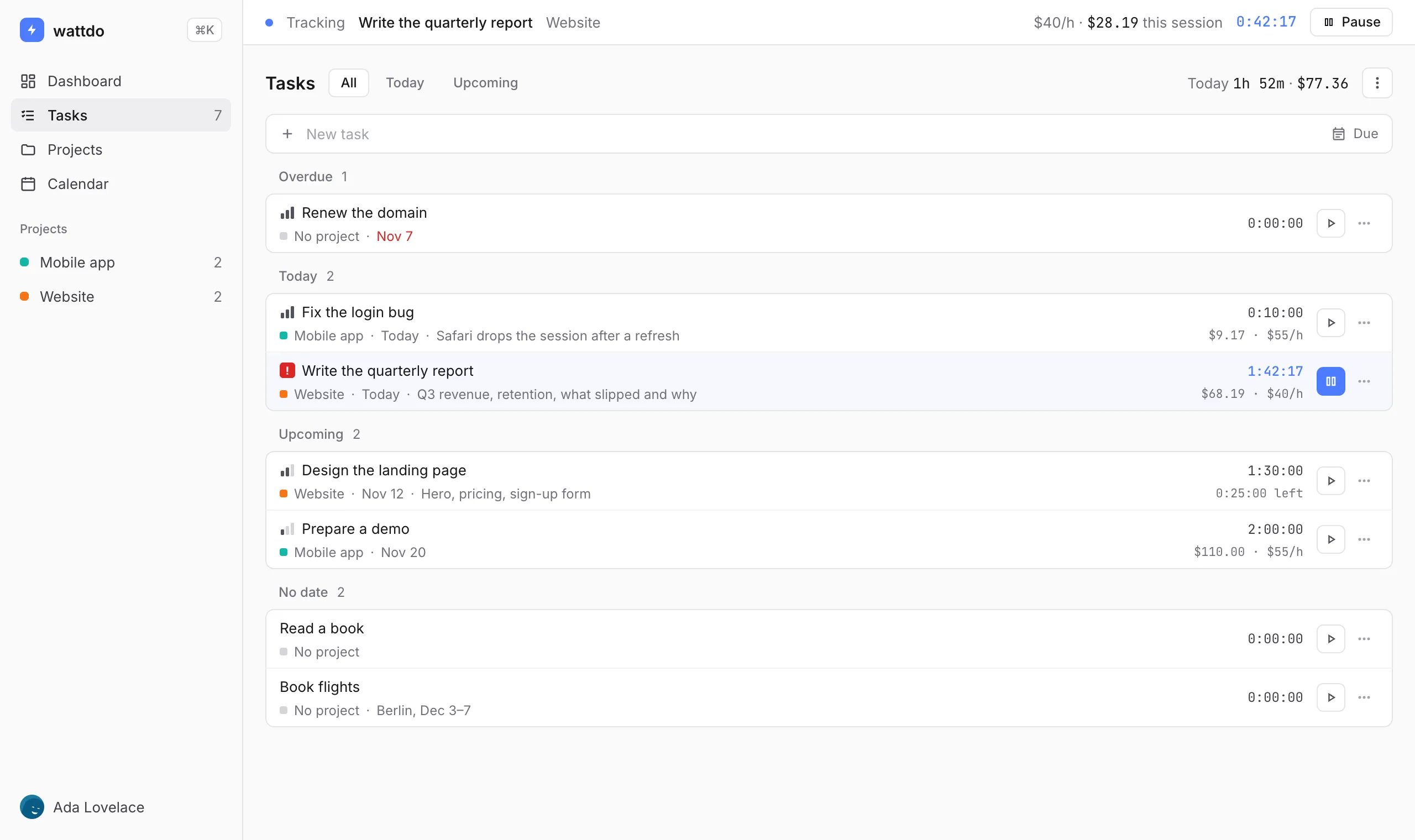
Everything a freelancer needs to bill by the hour
Billable hours in one click
Start the timer from the browser toolbar on any tab. Each start and stop is saved as a session. Forgot to stop it? Fix the session in the list or add the time you missed.
A rate for every client
Make a project for each client and set its hourly rate, in any currency. A task can have its own rate. Every session keeps the rate it was tracked at, so a raise never rewrites last month.
What each client earned
The dashboard shows hours per day and time and earnings by project for the last 7 or 30 days, so you can see which clients pay for your week.
Ready for your invoice
Export tasks and time to CSV and bring them into your invoicing tool or spreadsheet. Sessions and due dates can also go to Google Calendar, Apple Calendar or Outlook.
Works offline
Everything is saved on your device first, so the timer keeps running on a train or a client’s guest Wi-Fi. Sign in to sync the extension and the web app.
No monitoring
No screenshots, no activity tracking, no keystroke counting. You start and stop the timer yourself, and the extension asks for no permissions at install.
How freelancers use wattdo
- Create a project for each client and set your hourly rate.
- Add tasks with due dates and priorities.
- Press play when you start working, from any tab.
- At the end of the month, check the hours and earnings and export them for the invoice.
Set the right rate first
Not every hour you work is billable: finding clients, email and invoicing are work too, but nobody pays for them. Before you quote a client, work out the rate that covers your taxes, costs and time off.
Questions
Is it free for freelancers?
Yes. Tasks, the timer, sessions, hourly rates and earnings, sync, the dashboard, CSV export and the calendar subscription are free.
Can I track time for several clients?
Yes. Create a project for each client. Each project has its own hourly rate and currency, and the dashboard shows time and earnings per project.
Can I create invoices in wattdo?
Not yet. Export your tasks and time to CSV and use them in your invoicing tool or spreadsheet.
Does it track my activity or take screenshots?
No. wattdo only records the time you track with the timer. There are no screenshots, no app or website monitoring and no keystroke counting.
Does it work for consultants and contractors?
Yes. Anyone who bills by the hour across clients uses it the same way: a project per client, a rate per project, and the timer for each piece of work.
Do I need an account?
No. The extension works right away and stores your data on your device. Create an account when you want the same tasks on the web and other devices.
Start tracking billable hours today
Install the extension, create a project for your first client and press play. Free, no account needed.